Find archived work
Answer “didn’t we already look at this?” about work that has been put away: read what the ticket said, read its history, and restore it if it is live again.
Before you start: nothing special. Put-away work is hidden by default, not
protected: whoever could read an item before it was archived can read it after.
Restoring it needs manage_<type> on its board, the same capability that
archiving it needed.
Every default listing hides put-away work. Each one takes an opt-in, and the hits come back marked.
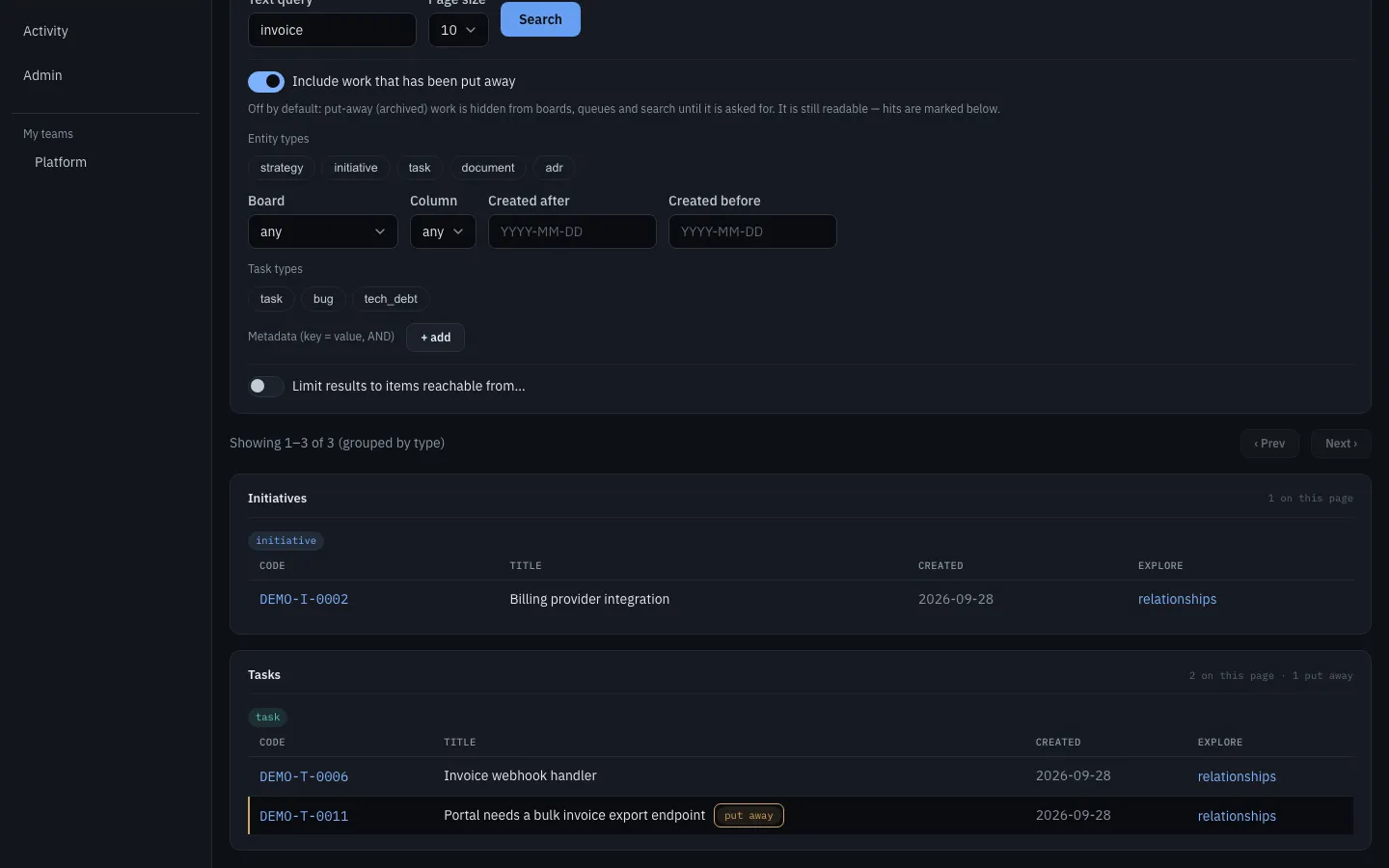
Search for it
Section titled “Search for it”In the GUI, turn on Include work that has been put away on the search page.
From the CLI:
kairos search --query "rate limiting" --include-deleted --limit 50--include-deleted composes with --query and with --from traversal; archived
hits carry archived_at in --json and are marked in the table. Without the
flag the same query returns nothing for that work, which is the point of putting
it away.
Read what it said
Section titled “Read what it said”kairos tasks get PLATFORM-T-0009Or over MCP, which is what an agent does: get_item renders the item with
ARCHIVED on it, and get_history reads back the versions.
get_history {short_code: PLATFORM-T-0009} # the version listget_history {short_code: PLATFORM-T-0009, version: 1} # what v1 actually saidBoth the item and its history answer for put-away work, and the item says of
itself that it is archived — so expect ARCHIVED in the output rather than a
404 (Archiving).
List a whole quarter
Section titled “List a whole quarter”For “what shipped last quarter?”, widen the listing rather than looking up short codes one at a time:
curl "https://<host>/api/tasks?limit=200&include_deleted=true" \ -H "Authorization: Bearer <token>"curl "https://<host>/api/boards/<board-id>/items?include_deleted=true" \ -H "Authorization: Bearer <token>"The board route gives 200 items in one response by default, and 1000 at most
(limit). total in the response is the number of items of the board. If
total is larger than the number of items in the response, send offset to
read the next page.
Over MCP, board_items {board, include_deleted: true} renders archived cards
marked [archived], in the column each was put away in. A result can be a part
of the board. Then its first lines say so, and they give the offset of the
next part.
Two things about the widened board listing, because they look like bugs:
- Archived cards appear in the column they were put away in, even if that column has since been removed from the live board. It is an audit view, not a board view.
- The opt-in does not change the counts. The blocks summary counts live rows only, and it leaves out every edge with an end in a done column. The children-progress rollup counts an archived child by the column that it was archived from: from a done column as done, from another column as removed. See what archive does to the numbers.
Put it back
Section titled “Put it back”kairos tasks restore PLATFORM-T-0009Also the Restore button on the item page, and MCP restore_item. The card
returns to its board and column, stops being marked archived, and is editable
again — put-away work is read-only until it is restored.
Restore does not un-cascade. Archiving a parent cascades to its children; restoring the parent restores only the parent, and the response lists the archived descendants it did not touch so each can be a separate decision. If you want the subtree back, restore each item.
A child that you find live below an archived parent is not an error. The archive takes only the children that its caller can edit. A child that the caller cannot edit stays live, and keeps its link to the archived parent. To put it away too, ask a person who can edit it.
When a restore is refused
Section titled “When a restore is refused”A write to put-away work is refused as if the item were not there — NOT_FOUND,
with the message No live item has the short code …. That is the read-only rule,
not a missing item; read it, or restore it first.
A restore itself is refused with 422 RESTORE_BLOCKED when the item’s board,
column, owning team or repository no longer exists. The refusal names what is
missing in details.missing, and the record stays readable so you can decide
where it should go instead. Kairos will not pick a new home for it
(why).
So when you meet RESTORE_BLOCKED:
- Read
details.missing— it names the board, column, team or repository. - Recreate what is missing, if that is the right answer (a removed column, for instance — see Set up a board).
- Otherwise treat the record as the audit material it now is, and raise fresh work that cites the short code.
A team that has been wound down takes its delivery board with it, which is the common way a restore becomes impossible — see Wind down a team.
What archiving never keeps from you
Section titled “What archiving never keeps from you”The activity log is the thinner record that survives everything: it says that the work existed and what happened to it, never what it said.
curl "https://<host>/api/activity?limit=200" -H "Authorization: Bearer <token>"Related
Section titled “Related”- Archiving — what put away means, and what it deliberately does not
- Archiving in the MCP surface
POST /api/{entity_type}/{short_code}/restore- Errors —
RESTORE_BLOCKEDand the rest, with their statuses