Run Kairos locally
In this tutorial we will start Kairos on your machine, sign in, and put a piece of work on a board. By the end you will have a running deployment with demo data in it and one task of your own, and you will have seen the same work from the command line and in the browser.
It takes about fifteen minutes, most of which is a Rust build.
Before we start
Section titled “Before we start”You will need:
- Docker, running. Kairos needs PostgreSQL and an identity provider, and we will run both in containers.
- Rust, via rustup. The repository pins its own toolchain, so you do not need a particular version installed.
- angreal:
pip install angreal. Most of the commands below go through it; two build and run the CLI withcargodirectly. - A clone of the repository, and a terminal in it.
We are running from a clone rather than from a release because this is the lesson where you look at Kairos, and the clone gives us the demo data to look at.
Start the backing services
Section titled “Start the backing services”Kairos keeps nothing itself — it needs a database, and it needs somebody to tell it who you are. Start both:
angreal services upYou should see two containers reported healthy:
Container kairos-dev-postgres Healthy Container kairos-dev-dex Healthykairos-dev-postgres is the database. kairos-dev-dex is
Dex, a small OIDC identity provider standing in for the
one a real deployment would bring. It already knows about four users, and we
will sign in as one of them.
Create the database and put some data in it
Section titled “Create the database and put some data in it”angreal db migrateThe last line tells you it worked:
All migrations completed successfullyangreal db seedThe first created Kairos’s tables. The second fills a tenant called demo
with a small organisation: two teams, a few boards, and a couple of dozen
items across them. The second prints an inventory of what it made — three
users, two teams, five boards and a couple of dozen items:
seeded tenant 'demo' (schema org_demo): 3 users (alice=org admin, bob, carol),2 teams, 2 repositories, 5 boards, 1 delivery stream(s), 1 strategy,4 initiatives (2 buckets), 11 tasks, 1 document, 2 ADRs, …If you have run it before it will say the tenant is already seeded and do
nothing; angreal db seed --force starts over.
Build the interface and start the server
Section titled “Build the interface and start the server”angreal web buildThis compiles the browser interface to WebAssembly. It finishes with:
GUI bundle written to crates/kairos-web/distNow start the server:
angreal dev serveIt builds and then starts — the first build takes a few minutes, and subsequent ones are seconds. When it is ready you will see:
Serving http://localhost:41080 (tenant `demo`, issuer http://localhost:41558/dex)Sign in as alice@kairos.test / alice-password. Ctrl-C to stop.Leave this running. Open a second terminal for everything below.
Look at it in the browser
Section titled “Look at it in the browser”Open http://localhost:41080. You will be sent to Dex to sign in. Use:
- Email:
alice@kairos.test - Password:
alice-password
Dex will hand you back to Kairos, and you will land on the boards overview. You should see five boards: Strategy, Initiatives, Architecture Decisions, and two delivery boards — Platform Delivery and Web Delivery.
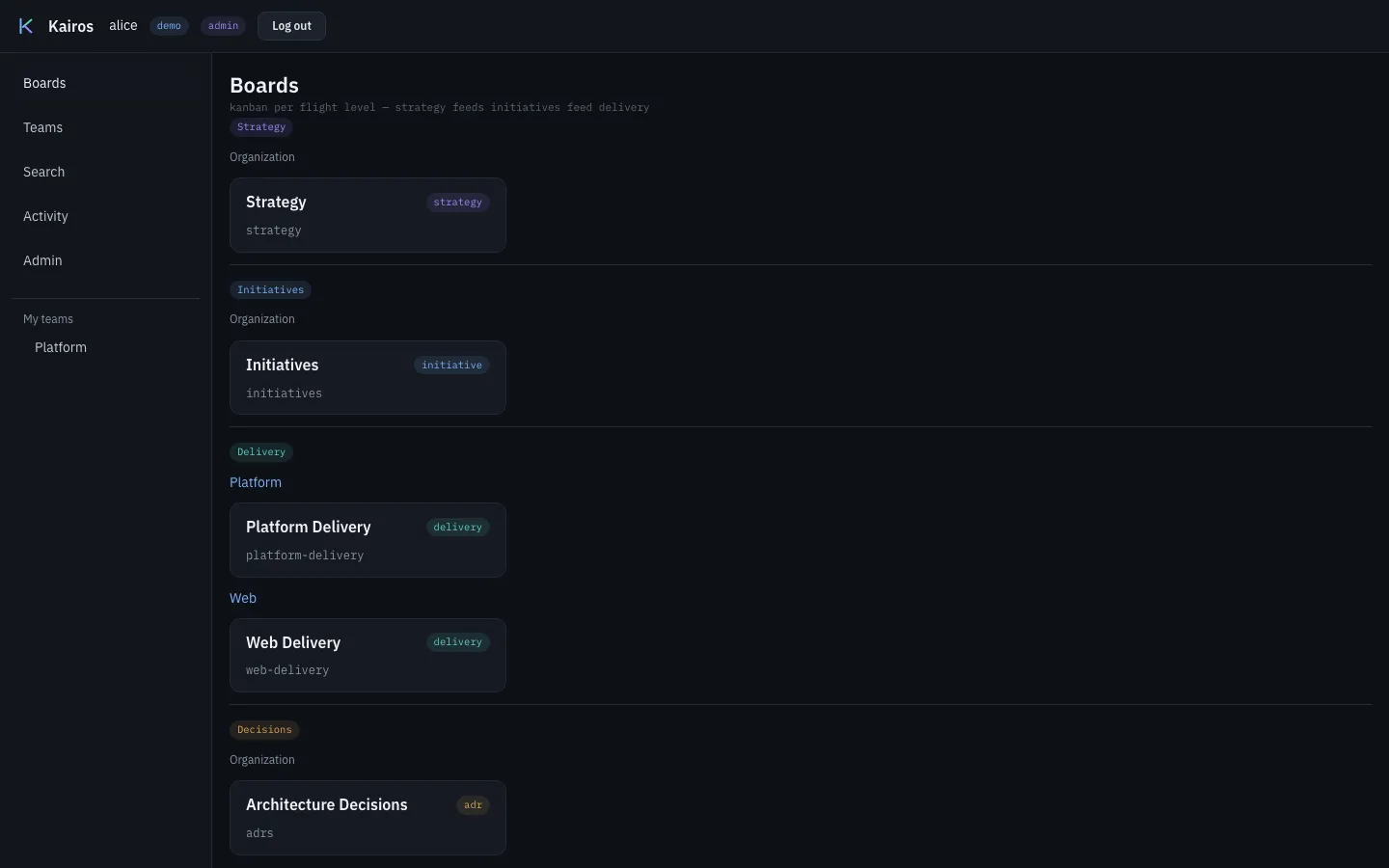
Notice they are grouped by level, and that only the delivery boards sit under a team name. Open Platform Delivery and you will see cards sitting in columns.
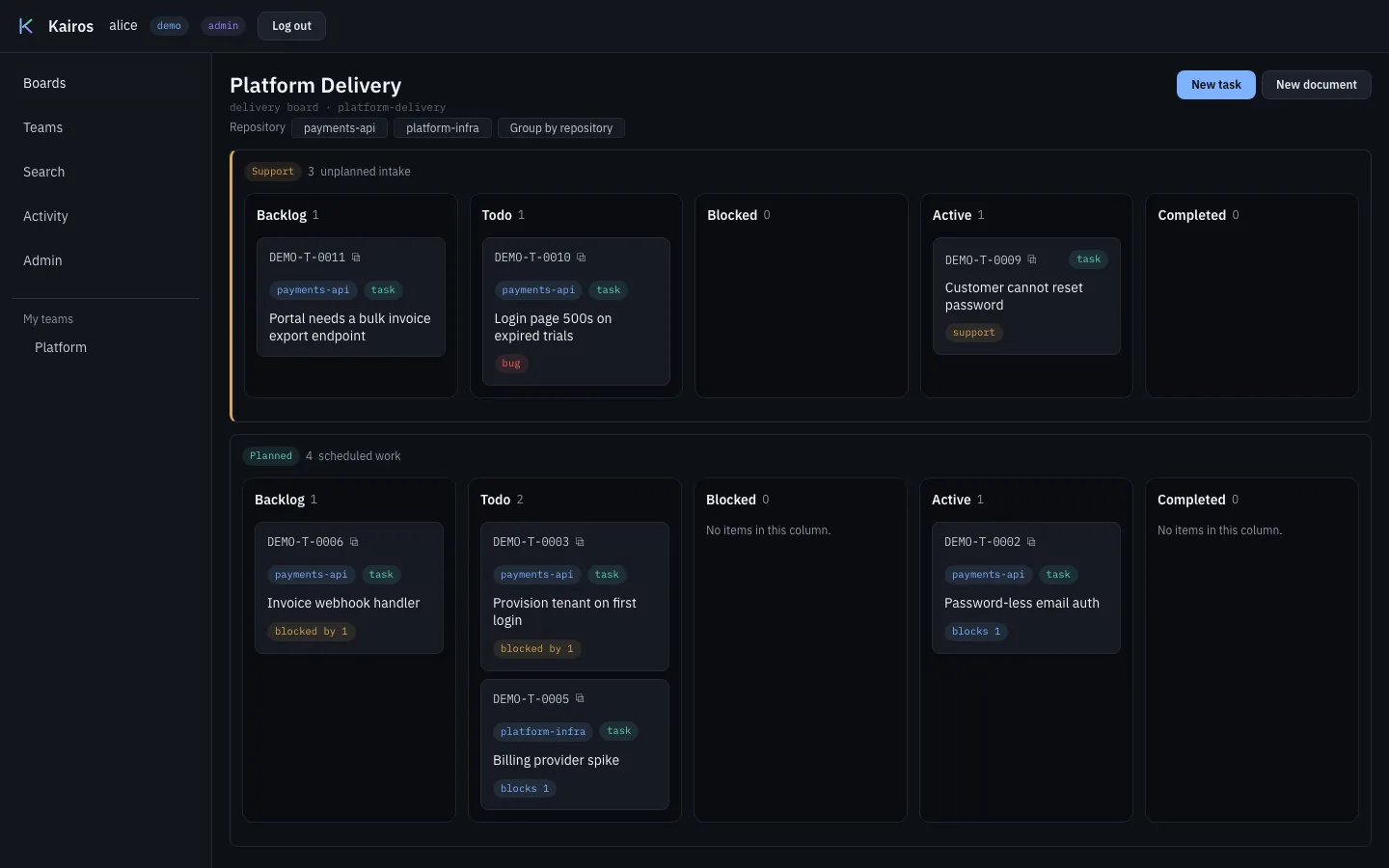
Two things that are easy to miss. The board is split into lanes — Support above, Planned below — so unplanned work arriving mid-week does not shuffle the plan. And each card carries the repository it links to, which says where the code for that task is.
That shape is the point of Kairos, and the flight levels page explains why there are three kinds of board rather than one. For now, notice that a delivery board belongs to a team while the upper boards do not.
Log in from the command line
Section titled “Log in from the command line”Kairos is not only a website — the same deployment answers a CLI and an agent-facing API. Build the CLI and log in:
cargo build -p kairos-cli./target/debug/kairos login --url http://localhost:41080The CLI prints a URL and a short code, and waits:
The OIDC issuer of the deployment is: http://localhost:41558/dex
To sign in, open: http://localhost:41558/dex/device?user_code=SBCM-THZP(As an alternative, open http://localhost:41558/dex/device and enter code: SBCM-THZP)
The CLI waits for the approval. It asks the issuer each 5 seconds. The code expires in 600 seconds.
Open that URL and sign in as alice@kairos.test again. The CLI notices and
stores the token. This is the OAuth device flow — the same thing a smart TV
does — so the CLI never sees your password.
Check who Kairos thinks you are:
./target/debug/kairos whoamiuser: alice <alice@kairos.test>org: demo (role: admin)teams: PlatformAlice is an admin of the demo organisation and a member of the Platform
team. That team membership is what lets her work on Platform’s board without
anybody granting her anything — see capabilities and
access.
Create your first piece of work
Section titled “Create your first piece of work”./target/debug/kairos tasks create \ --board platform-delivery \ --repo payments-api \ --title "Try Kairos out" \ --content "My first piece of work."Kairos made the task PLATFORM-T-0008 (version 1): Try Kairos outYour short code may differ — mine was PLATFORM-T-0008. Use yours below.
Notice that we said two things. The board says whose work this is: the task is on the Platform team’s board, so it is the Platform team’s task. The repository says where the code is, and it is only a link. That is repositories as execution scope.
Now look at the board the task is on. boards show takes the slug of the
board:
./target/debug/kairos boards show platform-deliveryBoard: Platform Delivery (slug platform-delivery, level delivery, id aa525a31-…)
== Backlog (3 items, id 76e86e75-1590-415e-8f48-cc37fa222a2b) PLATFORM-T-0004 [task] Invoice webhook handler PLATFORM-T-0007 [task] Portal needs a bulk invoice export endpoint PLATFORM-T-0008 [task] Try Kairos outYour task is in Backlog, the column new work arrives in.
Move it
Section titled “Move it”Each column’s id is printed next to its name above. Copy the id of the Todo column, and move your task there:
./target/debug/kairos tasks transition PLATFORM-T-0008 --to <the Todo column id>Kairos moved the task PLATFORM-T-0008 to the column 9b2a0dd5-c9ef-48e9-a947-d866dcf21618.Now go back to the browser and reload Platform Delivery. Your card has moved to Todo. The CLI and the interface are two views of one deployment, not two systems that synchronise.
The columns and the arrows between them are configuration rather than code, so Kairos knows which moves this board allows and refuses the rest — naming the columns you could have moved to instead. Errors describes that refusal, and every other one.
Ask what else touches this work
Section titled “Ask what else touches this work”Open any seeded task in the browser — click a card on a board — and scroll to Possibly related.
It has not searched yet. Click Find related work.
You should get a short list: each entry has a claim (prior_art,
near_duplicate, implicit_dependency), a short code you can click, and a
sentence saying why it was suggested.
Now read that list sceptically, because that is the point.
These are suggestions, not findings. Kairos measured this on 4,927 real documents before building it: pairs of genuinely related work average 0.80 similarity, and pairs of unrelated work reach 0.82. The distributions overlap, so no threshold can separate them, and roughly half of the strongest matches are wrong. There is no score on screen for the same reason — a number reads as a confidence no matter what the label says.
So the panel’s job is not to tell you the answer. It is to put three or four things in front of you that you would not have thought to look at, cheaply enough that being wrong half the time is still a good trade. You do the judging.
If you see “Semantic retrieval is not enabled on this deployment”, the server has
no embedding model — the dev server needs KAIROS_EMBED_ALLOW_DOWNLOAD=1 once to
fetch it. If you see “Nothing surfaced”, that is one search coming up short
rather than proof, which is worded that way deliberately.
An agent asks the same question through the same endpoint, and can propose a link for you to confirm — the Suggested links panel just above is where those arrive. Neither of you can create a relationship the other has not seen: Finding related work explains why that is a rule rather than a limitation.
What you have
Section titled “What you have”A Kairos deployment running against a real database and a real identity provider, with demo data, your own task on a board, two ways of reaching it, and a way to ask what else it might touch.
When you are finished:
# Ctrl-C the server, then:angreal services downThe database lives in a Docker volume, so angreal services up picks up where
you left off. angreal services clean removes the volume too.
A note on the identity provider
Section titled “A note on the identity provider”Kairos can also authenticate people itself, with an email and a password and no identity provider at all (Use local accounts). This lesson deliberately does not use it.
Two reasons. The Dex above costs you nothing extra — it comes up in the same
angreal services up that starts the database you need anyway — whereas local
accounts would add a password hash to generate and a first-boot admin to configure,
which is more steps rather than fewer. And this lesson teaches the shape Kairos is
built for: an organisation brings its own issuer. Local accounts are the small-team
exception, and a first lesson is the wrong place to teach an exception.
If you are here because you want to run Kairos for a handful of people and never touch an issuer, read Choosing how people log in after this — it is the page that tells you whether that is the right call.
Where to go next
Section titled “Where to go next”- Deploy Kairos to Kubernetes — the same thing for real, from the published chart and image
- Choosing how people log in — your issuer, a bundled Dex, or local accounts
- Install with Helm — when you have a cluster and a goal rather than a lesson
- Flight levels — why the boards are arranged the way they are
- CLI reference — every command and flag
- The how-to guides, for a goal you have rather than a lesson we chose