Performance Characteristics
This article describes Cloacina’s performance test suite, what the tests measure, how to interpret results, and guidance for tuning your deployment.
Performance Test Suite
Section titled “Performance Test Suite”Cloacina includes three performance tests in the examples/performance/ directory, each targeting a different execution pattern:
| Test | Directory | Workflow Shape | Tasks per Workflow |
|---|---|---|---|
| Simple | performance/simple/ |
Single task | 1 |
| Parallel | performance/parallel/ |
Fan-out/fan-in (setup, 3 parallel batches, merge) | 5 |
| Pipeline | performance/pipeline/ |
Sequential chain (extract, transform, load) | 3 |
All three tests share the same structure: configure a DefaultRunner with a given concurrency level, submit a batch of workflows concurrently using futures::future::join_all, and measure total elapsed time.
Test Configuration
Section titled “Test Configuration”Each test accepts two command-line arguments via clap:
--iterations <N> Number of workflows to execute (default: 150)--concurrency <N> Maximum concurrent tasks (default: 32)These defaults provide a reasonable baseline, but you can vary them to explore scaling behavior.
What the Tests Measure
Section titled “What the Tests Measure”Simple Performance Test (performance/simple/)
Section titled “Simple Performance Test (performance/simple/)”The simple test executes single-task workflows where each task inserts a “Hello World” message into the context.
What it reveals:
- Baseline execution overhead per workflow (scheduling, database writes, context serialization)
- Maximum throughput the system can sustain with minimal task work
- Database I/O performance, since the task body is trivial and most time is spent on infrastructure
- How throughput scales as you increase the
--concurrencyparameter
Because each workflow contains exactly one task, the workflows-per-second and tasks-per-second metrics are equivalent, making this test the clearest measure of per-workflow overhead.
Parallel Performance Test (performance/parallel/)
Section titled “Parallel Performance Test (performance/parallel/)”The parallel test executes fan-out/fan-in workflows: a setup_data task creates three data batches, three process_batch_* tasks run in parallel (each multiplying batch values), and a merge_results task combines the outputs.
What it reveals:
- Parallel task scheduling efficiency – how well the dispatcher handles tasks that become ready simultaneously
- Dependency resolution performance – the time spent determining which tasks are eligible to run
- Context merging overhead – parallel tasks all write to the shared context
- Database contention under concurrent load – multiple tasks per workflow compete for database writes
With 5 tasks per workflow, this test exercises the dispatcher’s ability to saturate available concurrency slots.
Pipeline Performance Test (performance/pipeline/)
Section titled “Pipeline Performance Test (performance/pipeline/)”The pipeline test executes sequential 3-task ETL workflows: extract_numbers produces data, transform_numbers doubles each value, and load_numbers writes the final result.
What it reveals:
- Sequential dependency chain overhead – each task must complete before the next starts
- How efficiently the system transitions between tasks within a single workflow
- The balance between per-task scheduling overhead and actual task execution
- Workflow completion time under different concurrency levels (concurrency primarily helps when running many workflows simultaneously, not within a single workflow)
Running the Performance Tests
Section titled “Running the Performance Tests”The performance tests can be run via angreal performance, which builds and runs all three test variants, generates metrics, and produces performance graphs. Individual tests can also be run manually from their directories under examples/performance/ using cargo run --release. Always use --release for meaningful performance numbers, as debug builds include additional checks that significantly affect throughput.
Interpreting Results
Section titled “Interpreting Results”Output Format
Section titled “Output Format”Each test prints:
Performance test completed!Configuration: 150 iterations, 32 concurrencyTotal time: 3.45sWorkflows per second: 43.48Success rate: 150/150 (100.0%)A 100% success rate is expected. If you see failures, investigate database connectivity or resource exhaustion before interpreting throughput numbers.
What to Expect
Section titled “What to Expect”Performance varies significantly based on hardware, database backend, and configuration. As a rough guide using SQLite on a modern laptop:
- Simple: Highest throughput (minimal per-task work)
- Pipeline: Moderate throughput (sequential overhead per workflow, but concurrency across workflows)
- Parallel: Lower throughput per workflow but higher total task throughput (more tasks per workflow means more database contention)
Scaling Behavior
Section titled “Scaling Behavior”The tests demonstrate consistent scaling patterns:
- Near-linear scaling up to 8 workers with efficiency above 85%
- Diminishing returns beyond 16 workers as database contention becomes the bottleneck
- Optimal efficiency in the 4-8 worker range for SQLite backends
- Higher optimal concurrency with PostgreSQL due to better concurrent write handling
Test Results
Section titled “Test Results”Performance test results and graphs are generated when running the tests. The following visualization shows comprehensive performance results for the pipeline performance test with SQLite backend across various configuration settings:
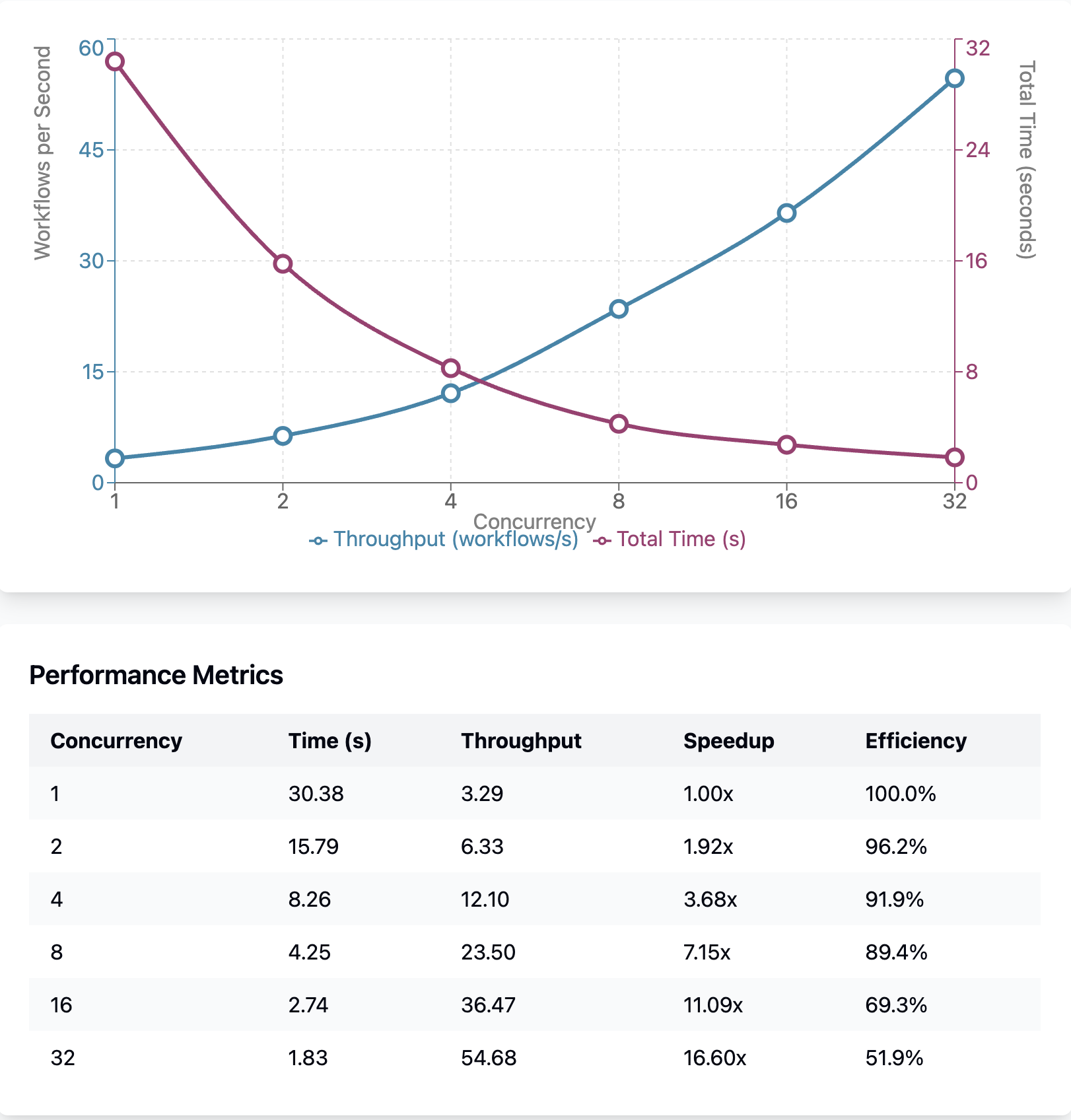
Performance characteristics of the pipeline performance test with SQLite backend across different concurrency levels and workflow complexities
Key Insights
Section titled “Key Insights”- Near-linear scaling up to 8 workers with 89.4% efficiency
- 16.6x throughput improvement achieved with 32x concurrency increase
- Diminishing returns observed beyond 16 workers (efficiency drops to 51.9%)
- Optimal efficiency range appears to be 4-8 workers for this workload
The visualization shows performance characteristics including concurrency levels, workflow complexity, and execution patterns for the pipeline performance test.
Parallel Performance Test Results
Section titled “Parallel Performance Test Results”The following visualization shows performance results for the parallel performance test with SQLite backend:
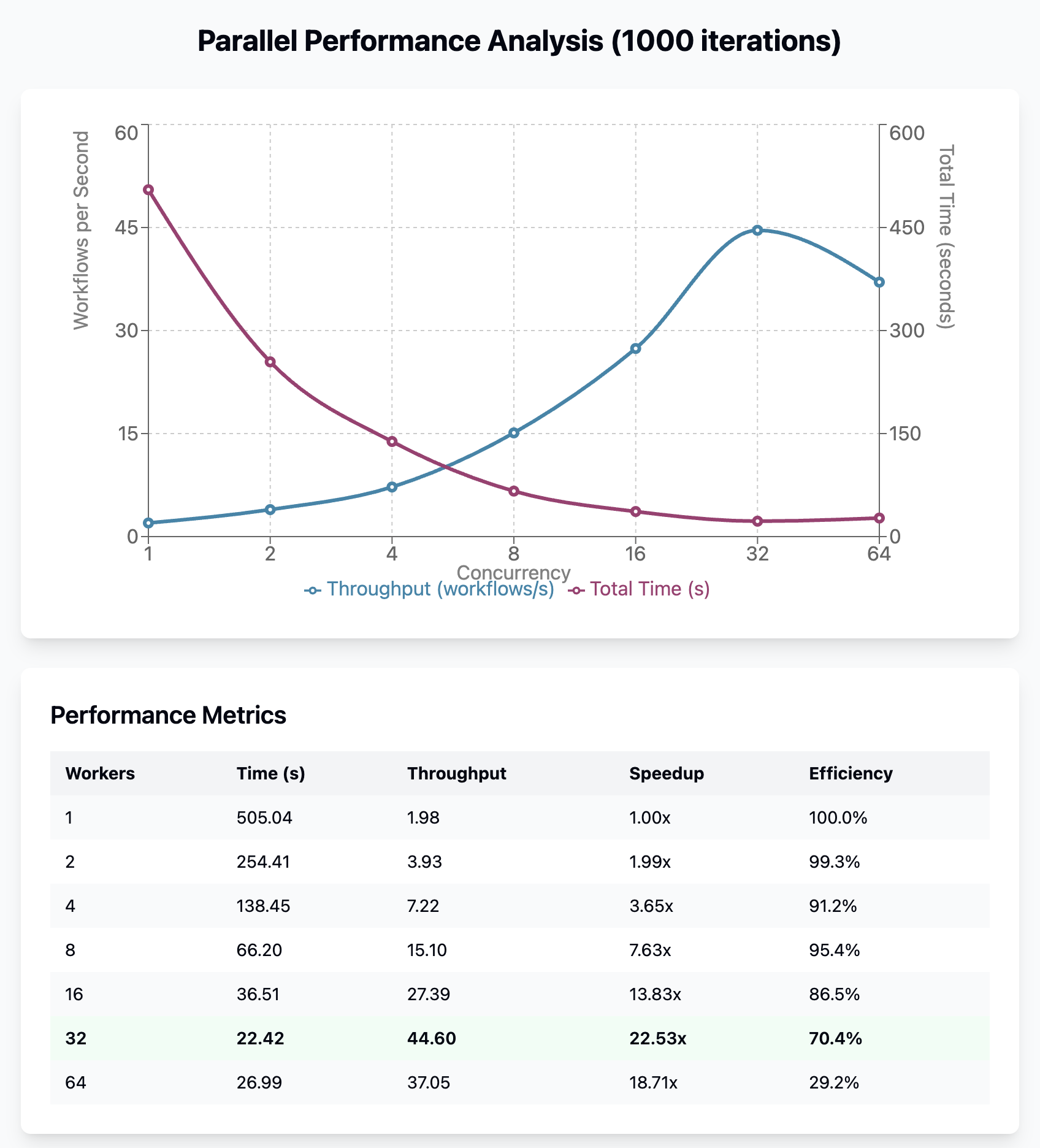
Performance characteristics of the parallel performance test with SQLite backend
The parallel performance test measures execution of workflows with multiple independent tasks that can run concurrently, testing the system’s ability to handle parallel task execution efficiently.
Key Insights
Section titled “Key Insights”- Peak performance at 32 workers: 44.60 workflows/s
- Performance degradation at 64 workers (37.05 vs 44.60 workflows/s)
- 22.5x speedup achieved with 32x concurrency (70.4% efficiency)
- Near-linear scaling up to 8 workers (95.4% efficiency)
Tuning Recommendations
Section titled “Tuning Recommendations”Why Concurrency Level Matters
Section titled “Why Concurrency Level Matters”The max_concurrent_tasks setting controls how many tasks can execute simultaneously. The optimal value depends on the nature of your workload:
- CPU-bound tasks benefit from a concurrency level at or near the number of CPU cores, because exceeding this causes context-switching overhead without additional throughput.
- I/O-bound tasks (database queries, API calls) can sustain 2-4x the core count, because most of their time is spent waiting on external systems rather than using CPU.
- SQLite backends introduce a write-lock bottleneck. The test results above show diminishing returns beyond 8 concurrent tasks because SQLite serializes all writes. This is why 4-8 workers is typically the sweet spot for SQLite.
- PostgreSQL backends handle concurrent writes through MVCC, which is why higher concurrency levels (16-32) remain efficient. The shift to PostgreSQL in production is often the single largest performance improvement for write-heavy workloads.
Why Database Backend Choice Matters
Section titled “Why Database Backend Choice Matters”SQLite and PostgreSQL have fundamentally different concurrency models. SQLite uses a single-writer lock, meaning all write operations are serialized regardless of how many tasks are running. This is perfectly adequate for single-node deployments and development, but becomes the primary bottleneck under parallel load. Cloacina automatically enables WAL mode and a 30-second busy timeout on every SQLite connection, which reduces contention failures but does not eliminate the serialization.
PostgreSQL uses multi-version concurrency control (MVCC), allowing multiple writers to proceed concurrently. Combined with connection pooling and schema-based tenant isolation, this makes PostgreSQL the better choice for production multi-tenant deployments where throughput matters.
Why Task Granularity Matters
Section titled “Why Task Granularity Matters”The performance tests reveal that per-task overhead (scheduling, database writes, context serialization) is a fixed cost. Tasks that do very little work will be dominated by this overhead, which is why batching many tiny operations into fewer tasks improves throughput. Similarly, large context values increase serialization time at every task boundary, so storing large data externally and keeping only references in the context reduces this cost.